



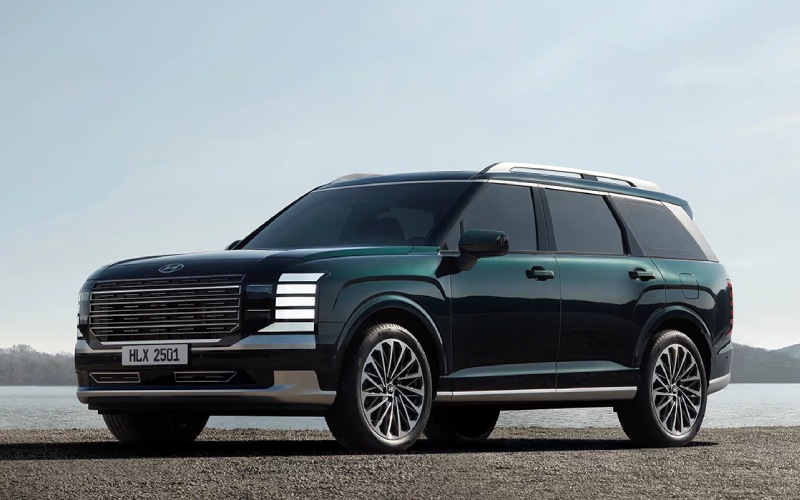
CardinaleWay Hyundai of El Monte – Is the 2026 Hyundai Palisade’s Built-in Dual-Camera Dash Cam Worth It for Daily Driving around San Gabriel, CA?
For many families and commuters, real confidence comes from knowing what happened and when. That’s precisely why the 2026 Hyundai Palisade’s built-in dual-camera Dash Cam stands out: it records while you drive and can automatically capture nearby movement when the vehicle is parked. If your daily loop includes school drop-offs in crowded lots or parallel parking on busy streets around San Gabriel, this integrated solution helps add accountability without the hassle of suction cups, dangling wires, or separate power cables.
Hyundai engineered the Dash Cam to integrate seamlessly with the Palisade’s head unit. You can review clips right on the center screen or easily offload them from the glovebox MicroSD card. Because the system ties into vehicle sensors, it can trigger event recordings in situations that matter—panic stops, unexpected bumps, or movement nearby while parked. And with front and interior views, it captures both the road ahead and the cabin environment, which is especially valuable for ridesharing, teen-driver monitoring, or simply keeping tabs on carpool activity.
To make the most of this built-in tool, it helps to set a routine that fits your everyday driving. Below are practical steps that maximize coverage and make retrieval simple without adding extra tasks to your day.
- Choose an appropriately sized MicroSD card: Confirm capacity and speed class in the Owner’s Manual so the Dash Cam can store clips reliably without overwriting too quickly.
- Set your recording preferences: Use the infotainment menu to specify loop length, event sensitivity, and whether parked-event triggers are active.
- Name and organize critical clips right away: After an event, tag and save the clip so it won’t be overwritten during normal loop recording.
- Check the lens views periodically: Make sure nothing is obstructing the cameras and clean the glass to maintain clear footage.
- Back up important clips to your phone or cloud: Export via the MicroSD card to store key recordings off-vehicle for safekeeping.
Beyond the Dash Cam, the Palisade’s safety-first mindset includes ten airbags, Hyundai SmartSense driver-assist technologies like Forward Collision-Avoidance Assist, Blind-Spot Collision Warning, Rear Cross-Traffic Collision-Avoidance Assist, and Safe Exit Assist, plus available Blind-Spot View Monitor and Surround View Monitor. Together, these features provide layered protection: situational awareness to help avoid incidents, structural protection if a collision occurs, and camera-based accountability when you need verification later.
Choosing a factory-integrated Dash Cam over aftermarket options also means the user experience is cleaner. You avoid extra wires, adapters that can loosen over time, and potential interference with other accessories. And because the Palisade Dash Cam is designed with the vehicle’s electrical and sensor architecture in mind, event triggers are smarter than simple motion-based detection from third-party devices.
Frequently Asked Questions:
Does the built-in Dash Cam record both while I drive and while I’m parked?
Yes. It can continuously record while driving and can automatically capture nearby movement when parked by leveraging vehicle sensor inputs. You can configure settings in the infotainment system for loop length and event sensitivity.
How do I access and save important footage?
View and tag clips right on the Palisade’s center display, or remove the glovebox-mounted MicroSD card to copy files to your computer or cloud storage. Tagging critical clips prevents them from being overwritten during normal loop recording.
Will the Dash Cam drain the battery when parked?
The system is engineered to balance recording capability with vehicle power management. Parked-event recording relies on vehicle sensors and is designed to operate responsibly, but always review your Owner’s Manual for best practices if storing the vehicle for extended periods.
Is the Dash Cam compatible with other Palisade safety features?
Yes. It is part of a broader ecosystem that includes Hyundai SmartSense technologies, camera views, and the vehicle’s sensor network. The integration helps enable more intelligent event detection compared to stand-alone aftermarket cameras.
If you want a single, elegant solution that improves accountability for everyday driving around school zones and urban streets, the Palisade’s built-in dual-camera Dash Cam is well worth it. For a closer look or a demonstration of how clips are stored and retrieved, visit CardinaleWay Hyundai of El Monte, serving Temple City, South El Monte, and San Gabriel.
Request more 2026 Hyundai Palisade information
Connect with us


- Hyundai
- Hyundai Dealer
- Hyundai Elantra
- Hyundai Elantra Hybrid
- Hyundai IONIQ 5
- Hyundai IONIQ 6
- Hyundai IONIQ 9
- Hyundai Kona
- Hyundai Palisade
- Hyundai Palisade Hybrid
- Hyundai Santa Fe
- Hyundai Santa Fe Hybrid
- Hyundai Service
- Hyundai Sonata
- Hyundai Sonata Hybrid
- Hyundai Tucson
- Hyundai Tucson Hybrid
- Hyundai Tucson Plug-in Hybrid
- Hyundai Venue
Categories
CardinaleWay Hyundai of El Monte
Address
3462 Peck Rd
El Monte, CA 91731
Phone
- Sales 626-686-3911
- Service 626-686-3912
- Parts 626-686-3913
| Monday | 9:00AM - 9:00PM |
| Tuesday | 9:00AM - 9:00PM |
| Wednesday | 9:00AM - 9:00PM |
| Thursday | 9:00AM - 9:00PM |
| Friday | 9:00AM - 9:00PM |
| Saturday | 9:00AM - 9:00PM |
| Sunday | 10:00AM - 6:00PM |
| Monday | 7:00AM - 6:00PM |
| Tuesday | 7:00AM - 6:00PM |
| Wednesday | 7:00AM - 6:00PM |
| Thursday | 7:00AM - 6:00PM |
| Friday | 7:00AM - 6:00PM |
| Saturday | 8:00AM - 4:00PM |
| Sunday | Closed |
| Monday | 8:00AM - 5:00PM |
| Tuesday | 8:00AM - 5:00PM |
| Wednesday | 8:00AM - 5:00PM |
| Thursday | 8:00AM - 5:00PM |
| Friday | 8:00AM - 5:00PM |
| Saturday | 8:00AM - 4:00PM |
| Sunday | Closed |
