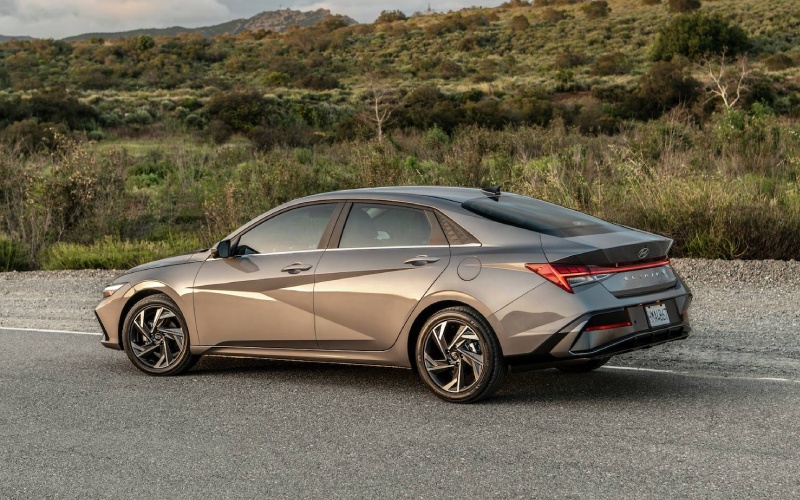
CardinaleWay Hyundai of El Monte - Why Wireless Apple CarPlay® and Android Auto™ in the 2026 Hyundai Elantra Matter for Covina, CA Commuters
If you drive the 210, 10, or 605 around Covina, CA, your in-car tech makes a real difference in how your day feels. That’s why wireless Apple CarPlay® and Android Auto™ in the 2026 Hyundai Elantra are more than box-checking features—they’re everyday time-savers that smooth out your routine. Without cables, your phone connects quickly, your apps launch cleanly, and your cabin stays uncluttered. And if you share the car, swapping drivers is simpler than ever. In a region where most trips involve short hops, quick errands, and bursts of traffic, a friction-free setup genuinely improves the drive.
The Elantra’s standard 8-inch touchscreen with wireless smartphone integration is responsive and well-laid out, so you can see your route, next turn, and music at a glance. Step up to the available 10.25-inch touchscreen with navigation, and the interface expands with crisp mapping, sharp graphics, and an adjacent 10.25-inch digital instrument cluster that presents lane guidance and turn prompts right in your sightline. Map reroutes feel smoother, voice assistance is quick to respond, and everything looks cohesive across the dual screens.
What Wireless Really Solves Day to Day
In older or less-equipped vehicles, smartphone mirroring often means hunting for the right cable, dealing with loose connections, and tucking cords out of the way so the console isn’t cluttered. Wireless Apple CarPlay and Android Auto in the 2026 Elantra reduce all of that to a single step: get in, start the car, and you’re connected. Your default music or podcast continues where you left off, phone calls resume through the car’s speakers, and messages are handled through voice commands, all while your hands stay on the wheel and your eyes on the road.
This quick-connect experience is perfect for Covina-area life—dropping kids at school near Badillo, picking up groceries by Citrus Ave, or navigating to weekend plans across the San Gabriel Valley. Because traffic can change minute by minute, quick, consistent access to your preferred navigation app reduces stress and keeps you informed about the best available route.
Setting Up Wireless Apple CarPlay or Android Auto
Most drivers can get going in under two minutes. Here’s a simple setup path that works for many smartphones.
- On the Elantra’s touchscreen, open the phone or device connection menu.
- Enable pairing mode and select your phone when it appears.
- On your phone, confirm the pairing request and allow permissions for contacts, messages, and notifications as desired.
- Open Apple CarPlay® or Android Auto™ and choose to connect wirelessly when prompted.
- Set your preferred navigation and music apps as defaults for a smoother startup every time.
After the first pairing, the Elantra typically reconnects automatically when you start the car. If your household has multiple drivers, each person can pair their phone and select preference settings, making transitions effortless.
Beyond the Basics: Elantra Tech That Complements Wireless Integration
Wireless smartphone mirroring is just part of the Elantra’s broader tech story. Available Hyundai Digital Key 2 Touch transforms a compatible smartphone into a key—unlocking doors and starting the vehicle—with the option to share access digitally when needed. Dual USB-C ports in the rear help passengers stay powered up, and the available wireless charging pad clears yet another cable from the cabin. Choose the Limited trim for Bose® Premium Audio, and podcasts, playlists, and audiobooks come through with depth and clarity that make traffic time more enjoyable.
In everyday driving, thoughtful details like a customizable instrument cluster and intuitive steering-wheel controls help you keep your focus forward. When paired with available Smart Cruise Control with Stop & Go and Highway Driving Assist on Limited, the Elantra adds a calm, composed feeling to freeway stints—especially useful on stretches of the 605 or during the afternoon slowdown along the 10.
How the 2026 Elantra’s Interface Helps You Stay Focused
Good in-car tech should do two things: reduce the number of steps it takes to complete a task and minimize distraction when you’re behind the wheel. The Elantra’s interface excels on both counts. Menus are simple, touch targets are well-sized, and voice controls through Siri or Google Assistant let you request directions, call a contact, or start a playlist without breaking concentration. The available dual 10.25-inch displays bring that information forward in a crisp, unified way, making it faster to glance, register, and get back to driving.
For Covina commuters who bounce between meetings, pickups, and errands, this clarity really matters. And when you factor in the Elantra’s generous rear-seat space—great for carpool duty—and its quiet, composed ride, you get a small sedan that works with your routine rather than asking you to adapt to it.
Tips for a Seamless Wireless Experience
- Keep software current: Update your phone’s OS and the Elantra’s infotainment software when prompted for the smoothest pairing and performance.
- Organize your home screen: Move your most-used apps—maps, music, messaging—to the first row so they’re easier to access on the car display.
- Use voice first: Get comfortable with Siri or Google Assistant for messages, calls, and directions to minimize time looking at the screen.
- Set audio levels: Adjust alert volumes and guidance prompts so navigation cues are clear but not disruptive.
If you want to explore how the 2026 Elantra’s tech fits your life, a short test drive focused on wireless connectivity is eye-opening. Pair your phone, set a route you often drive, and see how naturally everything fits together in motion.
Frequently Asked Questions:
Does wireless Apple CarPlay® and Android Auto™ come standard on every 2026 Elantra?
Yes—wireless smartphone integration comes standard with the Elantra’s 8-inch touchscreen across the lineup.
Can I still use a cable if I want to charge while driving?
Absolutely. You can charge via USB-C or use the available wireless charging pad. Either way, wireless CarPlay and Android Auto remain active once paired.
Which trims offer the dual 10.25-inch display setup?
The dual-screen configuration with a 10.25-inch touchscreen and a 10.25-inch digital instrument cluster is available on higher trims, with Limited offering the most comprehensive tech package.
CardinaleWay Hyundai of El Monte is proud to support drivers across the San Gabriel Valley, serving Covina, Azusa, and Altadena with a guided, hands-on approach to Elantra tech. Take a closer look at wireless Apple CarPlay® and Android Auto™ on a real route you drive every day, and you’ll see how this sedan turns daily commuting into a cleaner, calmer routine. Pair that with available Hyundai Digital Key 2 Touch, Bose® Premium Audio on Limited, and a suite of driver aids that make the freeway feel less demanding, and you’ve got a small sedan that truly respects your time.